

Fulfil and track shipments
Once an order is paid, the next job is getting it to the customer. Fulfillment is how you move an order from Paid toward Shipped — and CIQRA keeps a record of each step so your whole team can see what’s happened.
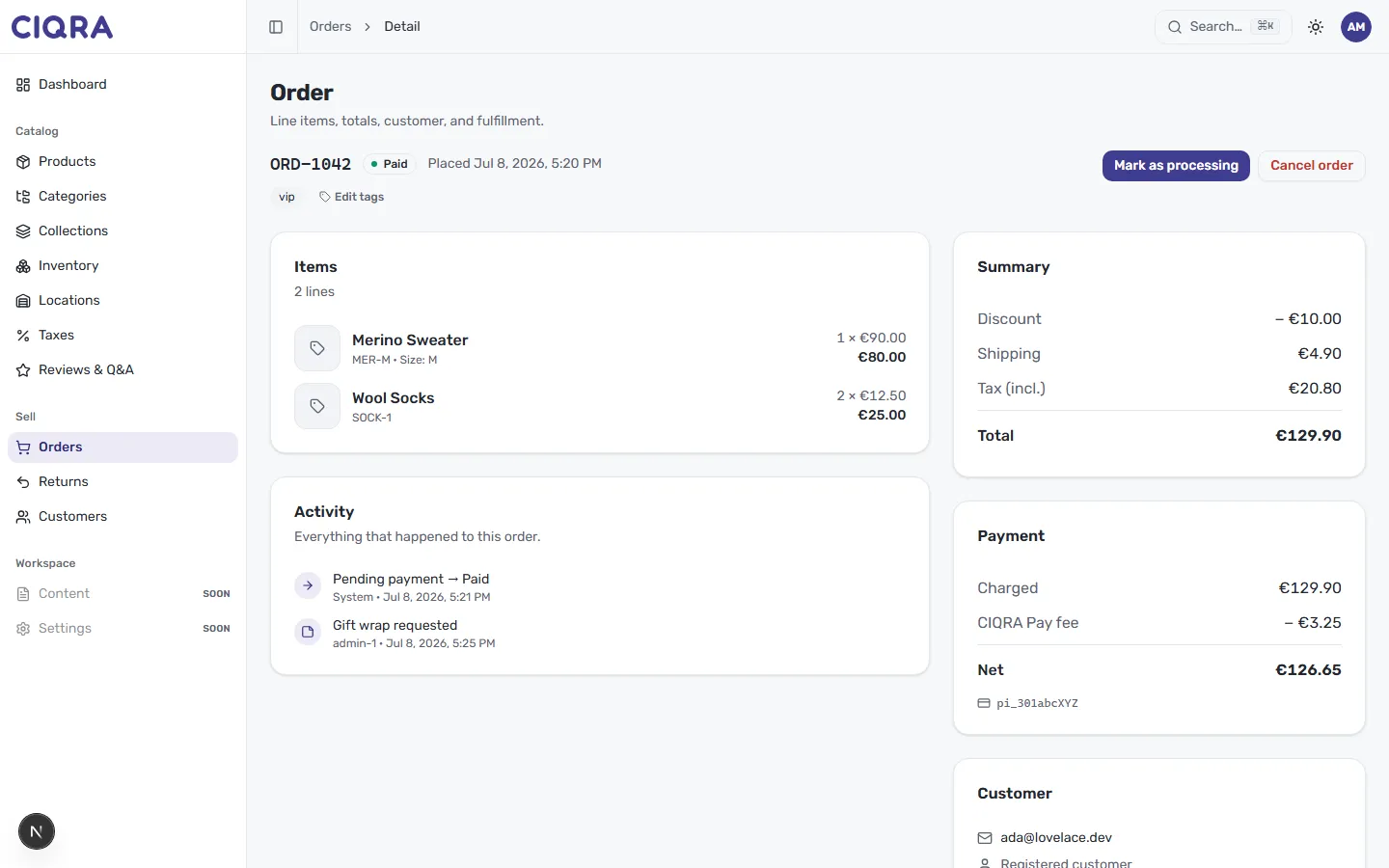
Move the order forward
Section titled “Move the order forward”At the top of a paid order, the header shows its current status (here, Paid) with the actions available on the right:
- Mark as processing advances the order in its lifecycle — your signal that you’ve picked it up and are getting it ready to ship.
- Cancel order stops an order you shouldn’t fulfil.
The buttons reflect where the order is right now. A paid order offers Mark as processing; at later stages you’ll see the action that makes sense for that step, on the way to the order becoming Shipped.
Watch the activity timeline
Section titled “Watch the activity timeline”The Activity card is the order’s running history — everything that happened to this order. It captures both automatic events and things your team adds. In this example it records a system event (Pending payment → Paid) and a staff note (Gift wrap requested). As you work an order, the timeline is where each change is written down, so nobody has to guess what stage an order is at or why.
Tracking a shipment
Section titled “Tracking a shipment”Tracking lets a customer follow their parcel from your door to theirs — usually a carrier and a tracking number attached once the order ships.